Hi! I’m Jen, a software engineer and gardener based in Atlantic Canada. For the past six months, I’ve been building Garden Sketchbook, a garden design app that combines 3D visualization with seasonal bloom previews. With the beta launching in just a couple weeks, I’m excited to share this tool I’ve been wanting for years (and hopefully help you avoid some of the gardening misadventures I’ve had along the way!).
Why I Built Garden Sketchbook
When my husband and I moved from our tiny urban condo to a house with a yard in 2017, I was so excited to have green space and couldn’t wait to get planting. I did a lot of reading, curled up to watch Gardener’s World in the evenings, and enthusiastically planned landscaping projects. I bought plants (of various prices) and dug holes (of various sizes and difficulties). Some of them worked out; some of them really didn’t.
The Problem: Learning the Expensive Way
I learned useful things from all of my plant experiments, but I wished I’d had a better design plan from the start — I would’ve made different plant choices and saved myself some work.
Like many gardeners, I’d make plans on graph paper or sketch things out with online tools, but I struggled to visualize how the garden would look throughout the year. We gardeners only have so much space, and if we want something blooming in every season, we have to allot it carefully. Just having a picture of all the plants in flower at once isn’t enough; which blooms will really appear together, and will I like how they look? These are expensive questions to answer through trial and error.
The Search for the Right Tool
I looked for an app that would let me create a to-scale garden plan and see a seasonal preview. While there were tools out there that had some of what I wanted, they were either:
- Too expensive, or Windows-only
- More focused on hardscape design, with not-very-specific plant info
- Hard to precisely plan spacing in 2D
What I really wanted was something that combined the precision of professional design tools with the ability to see my garden through all four seasons before I committed to buying any plants. I wanted to place a plant, instantly see it in 3D space, and then flip through spring, summer, fall, and winter to check the bloom schedule.
Building the Tool I Wanted
So I thought I’d try to build the tool I wanted to use myself. And it’s just about ready!
I’ve been working on Garden Sketchbook for about six months, combining my background in software engineering with everything I’ve learned from my gardening experiments. The result is a web-based garden planning app that:
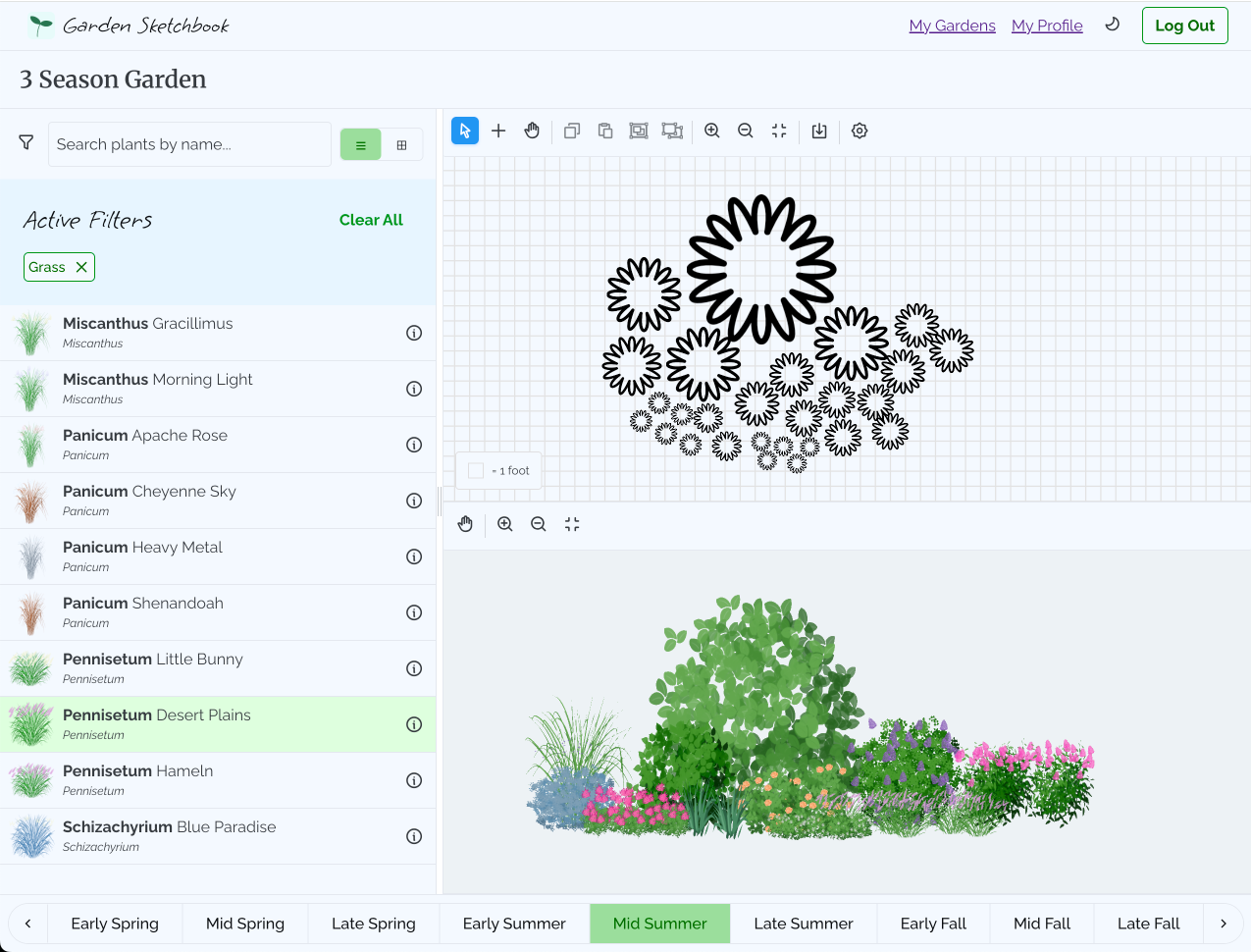
Combines 2D precision with 3D visualization — Design on a to-scale 2D canvas and instantly see your garden come to life in 3D. Place a plant and immediately see how tall it really is, how much space it takes up, and how it relates to everything around it.
Shows seasonal changes — Preview your garden in spring, summer, fall, and winter. Plants show their actual bloom periods, so you can spot any gaps where nothing is flowering, and fine-tune your color scheme.
Has a plant library with specific cultivars — Search through hundreds of perennials, shrubs, and trees with specific variety information and detailed growing requirements. Filter by zone, sun needs, soil type, bloom time, color, height, and special characteristics like deer resistance or drought tolerance.
Makes professional planning accessible — Use grid-based tools to place and space plants accurately, then export your plan as a printable PDF with a numbered plant list for easy shopping and planting.
Join the Open Beta (It’s Free!)
The beta launch is just a few weeks away, and I’m making Garden Sketchbook completely free during the open beta period. This is your chance to try all the features, plan as many gardens as you want, and help shape the app with your feedback.
This site is still under construction, and I’m taking care of behind the scenes tasks to get the app ready for you to check out. Keep an eye on my social media to find out when the beta is live.
Whether you’re planning your first garden bed or redesigning an entire landscape, I hope Garden Sketchbook gives you the confidence to experiment with ideas and visualize results before you start digging.
Over the coming weeks I’ll be posting more about the app’s features and how to get the most out of them. I’ll show you how the 2D to 3D visualization works, how to use seasonal planning to create year-round interest, and how the smart plant search can help you find the perfect plant for that impossible dry-shade corner.
Stay tuned for the next post in this series, where I’ll show you how the 2D to 3D design feature works and how it can change the way you plan gardens.